Email Signature Template Design 11: A Multi-Purpose Tool for Professional Communication
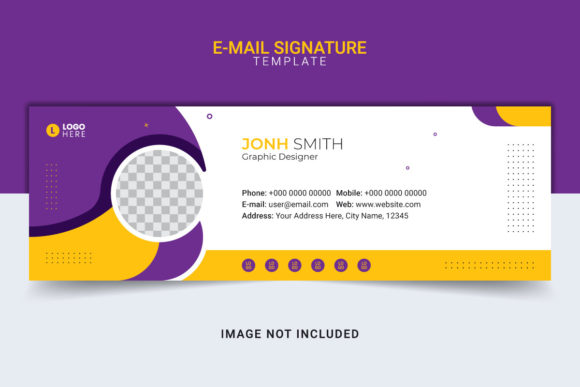
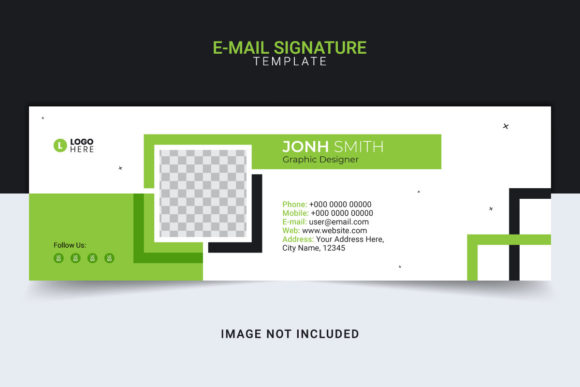
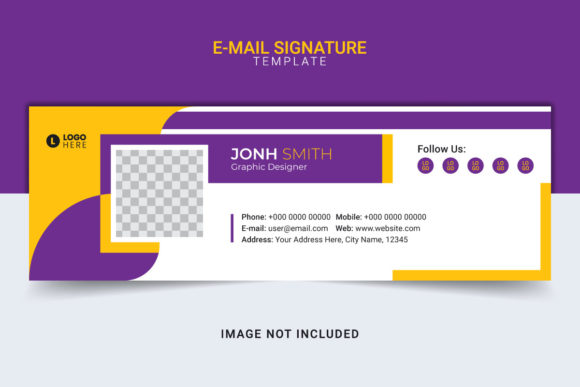
Email Signature Template Design 11 is a versatile and high-quality digital asset designed to streamline the creation of professional email signatures. Ideal for entrepreneurs, marketers, business professionals, and content creators, this template offers a structured layout with full editability in both AI Illustrator and EPS vector file formats. It ensures that your email communications maintain a consistent brand image while saving you time on design work.
Understanding the Structure and Purpose
At its core, Email Signature Template Design 11 serves as a ready-to-use blueprint for crafting visually appealing and informative email footers. The template includes one Adobe Illustrator (.ai) file and one Encapsulated PostScript (.eps) file, both sized at 600x200px. This standard size works well across most email platforms and devices, ensuring compatibility without compromising aesthetics.
The template's layers are fully editable, allowing users to modify text, graphics, and logos effortlessly. All elements are organized logically, making it easy to adjust specific parts without disrupting the overall layout. The use of RGB color mode supports vibrant and accurate color representation, especially when viewed on digital screens. Additionally, the font used is free and accessible, eliminating any licensing concerns during implementation.
Design Elements and Branding Integration
A strong email signature communicates professionalism and reinforces brand identity. With Email Signature Template Design 11, you can incorporate essential branding elements such as:
- Company logo or personal brand mark
- Contact information (name, title, phone, address)
- Social media links and icons
- Call-to-action buttons or promotional banners
- Custom colors and fonts aligned with your brand guidelines
This makes it an ideal choice for corporate teams, creative agencies, and small businesses aiming to maintain a polished appearance in all outgoing emails.
Where It Fits Into Your Workflow
Email Signature Template Design 11 plays a crucial role in different stages of communication planning and execution. Here’s how it can be integrated into your workflow before, during, or after key business or project activities:
Before a Project Launch
When preparing to launch a new product, service, or campaign, having a unified visual presence across all touchpoints is vital. You can begin by using Email Signature Template Design 11 during the pre-launch phase to establish a cohesive look in your team’s outbound communications. For example:
- Assign each team member their own version based on roles (e.g., sales, support, marketing).
- Incorporate temporary placeholders for upcoming campaigns or promotions.
- Test the signature across multiple email clients to ensure cross-platform compatibility.
This early integration helps build anticipation and maintains a consistent brand message from the first point of contact.
During Ongoing Operations
Once a project or business process is underway, the template becomes a part of daily communication routines. Its flexibility allows for quick updates as needed—such as adding a new website link or updating a social media profile. For instance, a content creator might update their email signature to include a new blog post or YouTube video link right after publishing, helping drive traffic directly from their inbox.
Marketing teams can also leverage the template to promote seasonal offers or events. By simply editing the text layer, they can insert event dates, special discounts, or referral codes tailored to current initiatives. This dynamic approach keeps your audience engaged without requiring a complete redesign each time.
After a Major Milestone or Decision
Following a significant decision—like rebranding or restructuring—Email Signature Template Design 11 becomes a powerful tool for maintaining continuity. It allows you to quickly roll out updated signatures across your organization, ensuring that all stakeholders reflect the new identity immediately.
For freelancers or educators who frequently collaborate with clients or students, the template can help reinforce trust and authority. After completing a course or delivering a project, a clean and updated email footer can serve as a subtle reminder of your expertise and availability for future work.
Interactions with Other Tools and Resources
One of the strengths of Email Signature Template Design 11 is its compatibility with various tools and workflows. As an AI and EPS file, it can easily be edited using Adobe Illustrator or other vector-based software. If you're working within a broader design ecosystem—like Canva, Photoshop, or even PowerPoint—you can export the final design as a PNG or JPEG and import it into those platforms for further customization or integration.
Additionally, the template aligns well with brand style guides and email marketing strategies. When paired with tools like Mailchimp, HubSpot, or Outlook, you can embed the finalized signature to maintain consistency across automated and manual email campaigns. For developers, embedding the signature via HTML code is straightforward, especially since the template is designed with web-friendly dimensions and formatting.
Collaboration and Team Use
In multi-user environments, such as agencies or startups, the template facilitates collaboration. Each team member can receive a copy of the file and personalize it according to their role and responsibilities. Because everything is fully editable, there's no need for back-and-forth between designers and end-users. Simply provide instructions on which layers to modify, and individuals can make changes independently without affecting the core design structure.
Practical Tips for Implementation
To get the most out of Email Signature Template Design 11, consider these practical tips:
- Organize Layers Clearly: Keep the layers labeled so that anyone editing the file can easily identify what needs to be changed.
- Use Smart Objects: Embed your logo or images as smart objects in Illustrator to preserve quality and allow for resizing without distortion.
- Optimize for Mobile: Preview the final output on mobile devices to ensure readability and alignment. The 600x200px size is generally responsive, but spacing and font choices matter.
- Export Multiple Formats: Save versions in PNG, JPEG, and PDF for use in different contexts—such as print, web, or embedded HTML.
- Standardize Across Platforms: Once customized, apply the same design across all email accounts and communication channels to avoid inconsistencies.
For businesses managing a large number of staff, creating a centralized folder with the template and clear documentation will help reduce errors and speed up adoption. You might also consider setting up a simple checklist for employees to follow when customizing their signatures.
Workflow Example: Onboarding New Employees
Here’s how a company could integrate Email Signature Template Design 11 into their HR onboarding process:
- HR receives a new hire’s details and brand assets.
- They open the AI file, replace placeholder text with the employee’s name, title, and contact info.
- The logo is updated if necessary, and social media links are adjusted.
- The final file is exported as a PNG and shared with the employee for insertion into their email client.
- An internal guide is provided to walk them through the setup process.
This efficient method ensures that every new team member has a professional email signature from day one, reinforcing brand identity and reducing redundant design requests.
Factors to Consider for Long-Term Use
While Email Signature Template Design 11 is highly functional, there are several factors to keep in mind for long-term usability and effectiveness:
Preparation and Documentation
Before distributing the template, prepare a brief user guide explaining how to access and edit the AI/EPS files. Include notes about where to find the free font used and how to replace it if desired. Providing clear instructions reduces confusion and unnecessary support requests.
Compatibility and Testing
Always test the final output in different email clients (Gmail, Outlook, Apple Mail, etc.) and on various devices. While the 600x200px format is widely supported, some clients may crop or scale the signature differently. Conducting a few tests ensures that your signature looks sharp and readable everywhere it appears.
Usability and Accessibility
Ensure that the text is legible and the background contrast is sufficient. Avoid overly complex animations or interactive elements, as many email clients do not support them. Simplicity often leads to better accessibility and fewer technical issues.
Organization and Version Control
Keep track of different iterations of the template. If your brand undergoes a refresh, maintain a history of previous designs so you can revert or reference them if needed. Naming conventions such as “Signature_Template_11_v2” or including dates can help manage this effectively.
Efficiency and Scalability
Using Email Signature Template Design 11 consistently across your team increases efficiency. It eliminates the need for custom designs for each person and allows for bulk edits when changes are required. This scalability is particularly useful for growing companies or those undergoing frequent updates.
Quality Control and Consistency
Set up a review process to ensure that all modified versions adhere to brand standards. Even though the template is fully editable, a lack of oversight can lead to variations in color, font, or layout. Using a centralized approval system or automated checks can help maintain uniformity.
Real-World Use Cases
Let’s explore a few scenarios where Email Signature Template Design 11 proves valuable:
Corporate Business Communications
A mid-sized corporation uses the template to create standardized email signatures for their customer service and sales departments. The template’s layered structure allows department-specific adjustments—like inserting a live chat link for support reps or a LinkedIn icon for salespeople—while preserving the main brand layout.
Creative Freelancers and Agencies
Freelancers and creative agencies often juggle multiple clients. They customize the template with their portfolio URLs, Instagram handles, and relevant hashtags depending on the industry or campaign they’re promoting. The ability to switch out content quickly helps maintain relevance in fast-paced fields like fashion, photography, or graphic design.
Small Business Owners and Startups
Startups and small business owners benefit from the cost-effective nature of the template. Without needing advanced design skills, they can produce a professional-looking signature that reflects their brand values. This is especially important when reaching out to investors, partners, or customers via email.
Conclusion
Email Signature Template Design 11 is more than just a design file—it’s a strategic component of effective communication. Whether you're launching a new venture, managing a growing team, or refining your brand image, this template provides a reliable foundation for creating email signatures that are both professional and adaptable.
By understanding how to implement and manage it within your existing workflows, you can enhance your digital presence and ensure that every email sent out represents your brand accurately. With features like full editability, scalable formats, and RGB optimization, it's a smart investment for anyone looking to improve their email communication strategy efficiently and affordably.